








|
Getting your Trinity Audio player ready...
|
Table of Contents
The software industry is evolving day by day as new products launch overnight, customer expectations shift instantly, and competition doesn’t wait for anyone. In this kind of landscape, teams can’t rely on rigid planning or slow execution. They need agility built into every stage of delivery. That’s exactly where agile project management reshapes the game, turning traditional workflows into flexible, collaborative, and fast-moving engines that actually keep up with today’s development cycles.
But here’s the truth many teams overlook: without the right agile software development management tools, even the strongest mindset can crumble. Tasks get scattered, communication slips, priorities get blurred, and before you know it, deadlines derail. This is why modern agile project development is about equipping your team with the systems that allow Agile to function the way it’s meant to.
The right tools enhance transparency, sync cross-functional teams, and prevent projects from spiralling into chaos. The wrong tools or none at all slow teams down, adversely impact productivity, and create unnecessary bottlenecks that directly affect product quality and speed.
In this blog, we’ll break down the top Agile project management tools that help teams stay aligned, move faster, and deliver better.
What Are Agile Project Management Tools?
Agile project management tools are software platforms designed to help teams plan, track, and manage projects using Agile principles. As Agile continues to dominate modern project delivery due to its flexibility and quick adaptability, these tools act as the digital foundation that keeps everything organized and moving smoothly. They bring teams into a shared workspace where collaboration, sprint planning, backlog refinement, and iterative execution become streamlined.
From industry-leading platforms like Jira to lightweight alternatives, Agile tools simplify task breakdown, prioritization, and real-time progress tracking. Many organizations even offer Jira and Agile-centric training so teams can get the most value from these systems and fully embrace the methodology. Organizations follow agile methodologies because agile projects are 28% more successful than traditional projects, according to one study by McKinsey & Company.
Beyond task management, these tools provide powerful reporting and analytics like velocity charts, burndown reports, and performance insights that help teams spot bottlenecks early and make informed decisions. They support collaboration, eliminate communication gaps, and enable faster delivery cycles.
Why Do Teams Need Agile Software Tools?
Agile only works when teams can adapt quickly, stay aligned, and keep information flowing without friction. Trying to manage an Agile environment without the right agile software development management tools turns every sprint into guesswork. With modern agile software tools, teams gain the visibility, coordination, and speed required to deliver results consistently. Below are the core reasons these tools are essential:
Efficient Project Management: Agile tools centralize planning, execution, and tracking so teams can manage backlogs, sprints, tasks, and timelines in one workspace. This makes it easier to stay organized, maintain focus, and deliver work on schedule.
Better Collaboration: With real-time communication, shared boards, and unified updates, team members can exchange ideas instantly and follow progress without chasing information. This ensures everyone moves in the same direction with minimal confusion.
Transparency and Visibility: Agile software tools provide live progress updates, visual dashboards, and status indicators. Stakeholders can instantly see what’s moving, what’s stuck, and what needs attention, reducing risks and improving accountability.
Continuous Improvement: Analytics, sprint metrics, and performance insights help teams review what worked, what didn’t, and what should change. This supports ongoing learning, stronger iteration cycles, and better long-term outcomes.
By enabling structured collaboration, clarity, and constant refinement, Agile tools make project delivery faster, smarter, and far more predictable. For a practical example of how structured task workflows transform productivity, explore our case study for tasks management platform for artwork creation, which demonstrates how Agile-style task management boosts clarity and results.

Best Agile Project Management Tools

1. Agile Manager
Agile Manager is one of the best agile tools designed specifically for agile teams. It offers features such as sprint planning, task management, and team collaboration. Agile Manager is a cloud-based Agile project management solution that is designed to help teams plan, track, and manage Agile projects.
Key Features:
- End-to-end sprint planning and backlog refinement
- Real-time task tracking with burndown/burnup charts
- Release forecasting and workload visualization
- Automated workflow configuration for agile project development
- Centralized communication panel for quicker decision-making
Integrations:
Agile Manager integrates seamlessly with CI/CD pipelines and version control systems, making it easier for teams to sync development workflows. It also connects with popular collaboration tools to streamline agile software development management tools in one place.
Best For: Teams needing a complete cloud-based Agile environment with real-time visibility across projects.
2. Asana
Asana is a well-known project management software platform, favoured by businesses of many sizes around the world. It offers robust Agile PM features too, including the ever-popular Gantt charts, as well as project roadmaps, dashboards, and content calendar management. It’s particularly helpful in keeping marketing teams organized and aligned with their goals.
Key Features:
- Timeline (Gantt) views for long-term planning
- Customizable workflows and project templates
- Advanced dashboards and reporting
- Workload balancing for resource management
- Kanban boards to support agile project management
Integrations:
Asana connects easily with Slack, Google Workspace, GitHub, and automation tools like Zapier. These integrations help agile project development teams streamline communication and automate recurring tasks.
Best For: Marketing, product, and cross-functional teams seeking visual project planning and team alignment.
3. Monday.com
Monday.com is a widely used project management platform that comprises a wide range of features that help enhance collaboration and support the sprints as well as the Agile workflows. Monday.com lacks the ease of ability to cross-tag among the organization’s multiple teams, and advanced analytics that are required for scaling organizations.
Key Features:
- Color-coded boards for sprint and task tracking
- Automation for repetitive workflows
- Sprint dashboards with real-time progress updates
- Custom widgets for team insights
- Workload management and file-sharing support
Integrations:
Monday.com offers integrations with tools like GitHub, Slack, Jira, and Microsoft Teams that help connect agile software development management tools to one unified workspace.
Best For: Teams looking for a customizable, visually appealing interface to manage collaborative Agile workflows.
4. Adobe Workfront
Perhaps because of their familiarity with its linked design software, Adobe Workfront is a popular platform with marketing organizations in particular. Its wide range of project management features is suitable for most teams, though, helping to streamline even the most complex and fastest-moving Agile workflows.
Key Features:
- Enterprise-grade workflow automation
- Advanced resource and capacity management
- Approval workflows tailored for creative teams
- Real-time reporting and productivity analytics
- Strong governance controls for complex agile project management
Integrations:
Connects with Adobe Creative Cloud, Microsoft 365, Slack, Salesforce, and more, offering a comprehensive ecosystem for teams running large-scale agile project development efforts.
Best For: Creative, marketing, and enterprise teams managing large cross-departmental Agile initiatives.
5. Jira Work Management (Atlassian)
Started as a software development solution and now a part of the Atlassian Group, Jira is popular among the developer community. It has evolved its capabilities over the years, and now it serves industries of many verticals with its multiple uses, continuing with Jira Work Management as its flagship tool. The reason behind being so popular among the agile software development teams is its ability and flexibility to work through diverse agile project workflows and product life-cycle that includes daily scrum, sprint, and product backlog.
Key Features:
- Scrum and Kanban boards built for deep Agile workflows
- Advanced backlog management and sprint planning
- Native automation rules
- Release and deployment tracking
- Customizable agile reporting (velocity, burndown, cumulative flow)
Integrations:
Jira integrates with Bitbucket, Confluence, GitHub, Jenkins, Slack, and thousands of marketplace apps, making it one of the most extensible agile software development management tools.
Best For: Software development teams and engineering projects requiring strong sprint governance and technical integrations.
6. Microsoft Project
Part of the Microsoft Planner / Microsoft 365 offering, Microsoft Project was designed to bring together the best of the brand’s project management functionality in one platform. Its familiar interface appeals to people who already work with Excel, Word, and Teams. It handles single projects well, but once you start managing multiple projects at the same time, it begins to fall short.
Key Features:
- Detailed Gantt chart and project scheduling tools
- Resource and budget management features
- Timeline forecasting and dependency mapping
- Real-time collaboration through Teams integration
- Portfolio-level insights for single-project analysis
Integrations:
Microsoft Project integrates deeply with the Microsoft 365 ecosystem, including Teams, Excel, SharePoint, and Power BI, giving teams strong analytical and collaboration capabilities.
Best For: Teams already using Microsoft 365 and managing structured or linear Agile-adapted projects.
7. Teamwork
Launched in 1999, Teamwork is a Ireland based robust project management platform. It has a range of features that support the methodology and agile workflow. Also, it supports project visualization, instant messaging, and file-sharing, and detailed project planning tools, making it one of the favourite tools among agile teams.
Key Features:
- Task boards, project portfolios, and milestones
- Time tracking and workload tools
- Client-level access for service-based teams
- Real-time messaging and file sharing
- Project scheduling and risk monitoring
Integrations:
Teamwork connects with HubSpot, Slack, Google Drive, Microsoft Teams, and GitHub, supporting wider agile project management ecosystems.
Best For: Agencies, service providers, and teams handling multiple client-based Agile projects.
8. ProofHub
ProofHub is a tool that can help scaled Agile teams implement and execute their plan effectively. It is an all-in-one platform that can meet all the project-related needs. It includes tools such as a task manager, team accountability tracker, custom workflows, and other features required for efficient management.
Key Features:
- Custom workflows for Agile and SAFe practices
- Centralized project communication hub
- Task, milestone, and dependency management
- Gantt views and Kanban boards
- Built-in proofing and approvals
Integrations:
ProofHub integrates with Google Drive, OneDrive, Dropbox, and Box, allowing teams to connect storage and collaboration tools seamlessly.
Best For: Teams adopting Scaled Agile frameworks or managing multi-level Agile processes.
9. Zoho Sprints
Zoho Sprints was initially designed for the real estate industry, but over time, teams from multiple industries started relying on the task and project management tools within its software. It includes a CRM, recruitment system, and sales platform. Zoho sprint still offers a wide range of specialized features that support the Agile methodology despite the launch of Zoho Projects, launched for robust project management.
Key Features:
- Backlog prioritization and sprint planning
- Timesheets and detailed activity tracking
- Real-time Scrum boards
- Agile reporting: velocity, burnup, burndown
- Collaboration tools with in-built chat
Integrations:
Zoho Sprints integrates with Zoho’s ecosystem (CRM, Books, Desk) and also connects with GitHub, Bitbucket, GitLab, and Slack for end-to-end agile project development workflows.
Best For: Small to mid-sized teams wanting cost-effective Agile sprint tracking and collaboration.
10. Jenkins
Jenkins became the standard for continuous integration servers, though it was developed as a build automation tool for Java applications in the initial stage. It is an open-source platform that offers more than 1400 plugins for seamless integration with other platforms. Jenkins provides a web-based dashboard for project management, and it is popular among developers because it is easy to use, install, and set up.
Key Features:
- Powerful CI/CD automation engine
- Extensive plugin ecosystem
- Pipeline-as-code capabilities
- Automated testing and deployment workflows
- Scalable master-agent architecture
Integrations:
Jenkins integrates with virtually every major development tool, such as GitHub, GitLab, Bitbucket, Docker, Kubernetes, Jira, and more, making it essential in agile software development management tools and pipelines.
Best For: Engineering teams requiring automated continuous integration and continuous delivery workflows.

Key Factors to Consider When Selecting Agile Project Management Tools
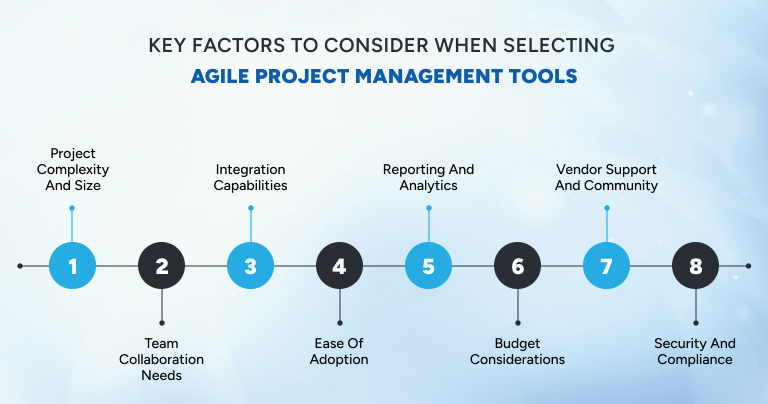
Choosing the right tool for agile project management directly impacts how smoothly your team collaborates, adapts, and delivers results. To ensure you pick solutions that truly support your workflow, your goals, and your growth, here are the core considerations every team should evaluate:
1. Project Complexity and Size:
Large-scale initiatives with layered workflows often require advanced features found in powerful agile software development management tools, while smaller teams may thrive with lightweight, simpler solutions. Matching the tool to the scale of your agile project development prevents friction down the road.
2. Team Collaboration Needs:
Agile thrives on communication. Choose tools that support real-time collaboration, seamless file-sharing, and smooth handoffs. The easier it is for your team to interact, the stronger your Agile outcomes become.
3. Integration Capabilities:
Your tool should fit naturally into your existing ecosystem. Integrations with CI/CD pipelines, version control systems, automation tools, and communication platforms help streamline your development process and reduce manual work.
4. Ease of Adoption:
Look for intuitive interfaces that your team can learn quickly. A tool that blends effortlessly into daily routines accelerates adoption and eliminates resistance.
5. Reporting and Analytics:
Strong Agile execution depends on data. Ensure your tool provides velocity metrics, burndown charts, customizable dashboards, and trend insights to support smart decision-making.
6. Budget Considerations:
Evaluate both upfront and recurring costs. Some tools offer free tiers, while others operate on subscription models. Choose an option that gives you meaningful ROI without stretching your budget.
7. Scalability:
As your team or project evolves, your tool should grow with it. Scalable platforms prevent you from switching systems later, saving time, money, and energy.
8. Vendor Support and Community:
Solid documentation, responsive support, and an active user community make troubleshooting faster and implementation smoother.
9. Security and Compliance:
Agile tools should include enterprise-grade security, data protection standards, and compliance features. This ensures that your project data remains safe, reliable, and audit-ready.
Conclusion
Agile project management has become the backbone of modern digital delivery because in a fast-moving environment, teams can’t rely on slow processes or outdated systems. The right tools enable clarity, speed, and collaboration, empowering teams to adapt quickly and ship high-quality work consistently.
At Ace Infoway, we rely on industry-leading Agile project development practices and advanced Agile tools to ensure every project is executed with precision, transparency, and predictable outcomes. Our commitment to agility allows us to deliver scalable, efficient, and future-ready solutions for businesses that cannot afford delays. If you’d like to explore how we can support your next project, feel free to contact us.
FAQ
What is the difference between Agile project management and traditional project management?
Agile relies on iterative cycles, continuous feedback, and flexibility, enabling teams to adapt to changes quickly. Traditional project management follows a linear, sequential process where planning is done upfront with limited room for change. This makes Agile ideal for fast-paced environments, while traditional methods suit predictable, fixed-scope projects.
How long does it take to fully implement Agile project development in a team?
Most teams generally take 2–3 months to become comfortable with Agile practices like sprints, standups, and retrospectives. However, true Agile maturity depends on consistent training, leadership support, and using the right project management tools
How do Agile teams measure productivity and success?
Teams track performance using metrics such as velocity, cycle time, lead time, and sprint goal completion. These indicators help teams understand their delivery speed and identify improvement areas. Consistent measurement ensures better planning, transparency, and predictable outcomes.
Can Agile be combined with other methodologies like Waterfall or DevOps?
Yes, many businesses successfully use hybrid approaches like Agile-Waterfall to balance structure with flexibility. Agile also integrates well with DevOps, enabling continuous development, testing, and deployment. These combinations help teams optimize workflows while maintaining quality and speed.
How often should sprint reviews and retrospectives be conducted?
Sprint reviews and retrospectives are typically held at the end of every sprint, usually every 1–2 weeks. Reviews allow teams to demonstrate completed work, while retrospectives help reflect on improvements. Conducting them regularly ensures continuous learning and better alignment.