








|
Getting your Trinity Audio player ready...
|
Table of Contents
Gartner forecasts worldwide IT spending will reach USD 6.31 trillion in 2026, growing 13.5%, with cloud the dominant component. Over the same period, the 2026 State of the Cloud Report, surveying more than 750 cloud decision makers, records wasted cloud spend rising to 29%. Most companies waste money moving to the cloud not on technology but on management and orchestration.
Organizations often rely on outdated lists of technology instead of using modern tools to ensure reduced technical debt. Plus, moving entire systems without proper data management and not figuring out how systems will communicate with each other during migrations costs these companies their operations.
Cloud service providers offer a pay-per-use model. So, planning your cloud migration becomes crucial, or it can lead to increased budgets.
This guide will help you plan your cloud migration effectively by offering the best business case, portfolio disposition using the 7Rs, wave design, cloud data migration, the security baseline, a tooling reference, cost governance, and commercial models for engaging a delivery partner.
What is Cloud Migration Consulting (And When Do You Actually Need It)?
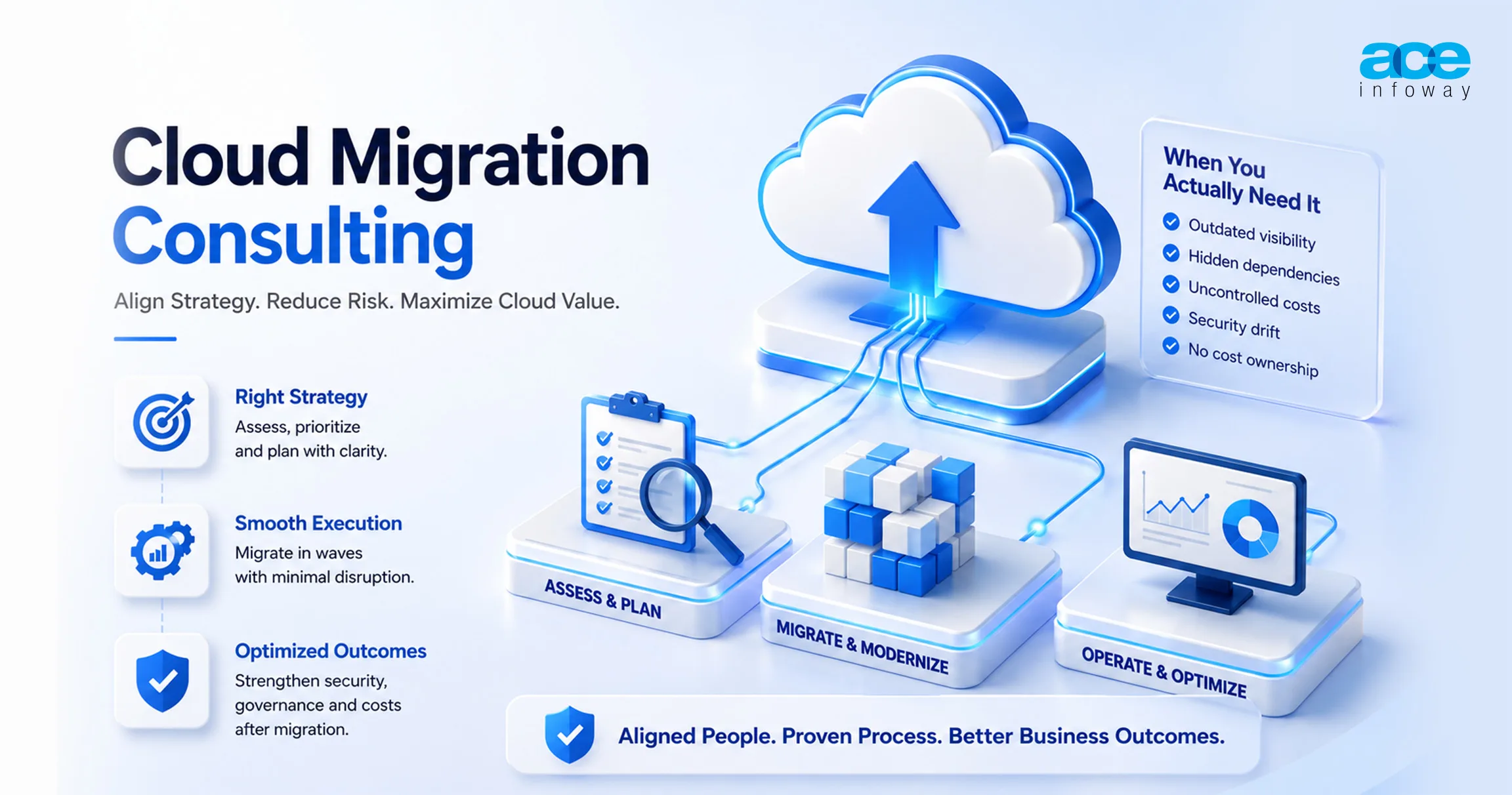
Cloud migration consulting is a professional service designed to close the gap between capital committed and value realized during an enterprise’s transition to the cloud.
Contrary to popular belief, this type of consulting is rarely about fixing a “technology gap,” as major hyperscaler platforms (AWS, Azure, and Google Cloud) are largely mature, interchangeable, and work perfectly well for standard workloads.
Instead, the sources emphasize that migration friction and “capital bleed” usually stem from human and operational misalignment.
What Cloud Migration Consulting Actually Is
True consulting in this space is a fundamental restructuring of business operating models, rather than a standard IT infrastructure project. It focuses on solving critical governance failures by executing a chosen strategy against a documented plan, often referred to as a Migration Runbook, which enforces accountability at every stage.
Key services typically covered in a consulting engagement include:
- Discovery and Readiness Assessments: Using data-driven tools to identify what is actually running rather than relying on outdated lists.
- Workload Prioritization: Categorizing applications (using frameworks like the 7Rs) and sequencing them based on business impact and technical complexity.
- Phased Execution: Managing the actual movement of workloads in “waves” to reduce risk and maintain business continuity.
- Post-Migration Operations: Implementing continuous infrastructure monitoring and FinOps (financial operations) to ensure costs stay optimized after the “cutover”.
When Do You Actually Need It?
In fact, cloud migration consulting is essential when you think that your organization and management are holding you back. In particular, when an organization faces the five pillars of governance failure, then it should seek external assistance:
- Outdated Configuration Management Databases (CMDBs) instead of real-time discovery tools are being used to map your environment.
- Undiscovered Dependencies: You don’t know the amount of network mapping you would need to make, so you don’t need to avoid “latency nightmares” from moving an application without its tightly coupled database or downstream services.
- Unmodelled Egress Costs: You’ve configured multi-cloud or hybrid deployments, but not mapped out all the data transfer patterns, and now hidden “data gravity” costs are eating up your compute savings.
- Security Drift: You’re making manual security changes to your processes that are drifting away from your baseline security policies and need to be monitored automatically through Infrastructure as Code (IaC).
- Orphaned Cost Ownership: As a central IT team pays the unified cloud bill, individual application owners don’t care about optimizing compute footprint.
Additional Indicators for Consulting
In addition to these governance lapses, some situational triggers will require consulting:
- Talent and Bandwidth shortfalls: Your internal IT team may be overwhelmed and without the bandwidth to maintain day-to-day operations and execute a complex migration at the same time.
- High Complexity/Legacy Systems: You are using mainframes, proprietary databases, or have a highly customized legacy system that needs to be transitioned without impacting core processes, which may require specialized skills.
- Executive Alignment: You need to find a partner who can communicate with both the CTO and the CFO and bridge technical migration decisions with your business transformation and financial results.
Your migration involves highly regulated data (Healthcare, Finance, Government) subject to strict compliance regimes, such as HIPAA, GDPR, and FedRAMP.
The Business Case: Real Benefits of Cloud Migration (With Numbers)
It is no longer a tactical IT upgrade; cloud migration is now a change in business operating models with a focus on gross margins and growth. The business case is based on tangible value creation and no ‘capital bleed’ for the CFO, and it’s a case of execution.
If you want to know how much money you can save, here’s the savings you can actually expect.
Cost: What the Savings Actually Look Like
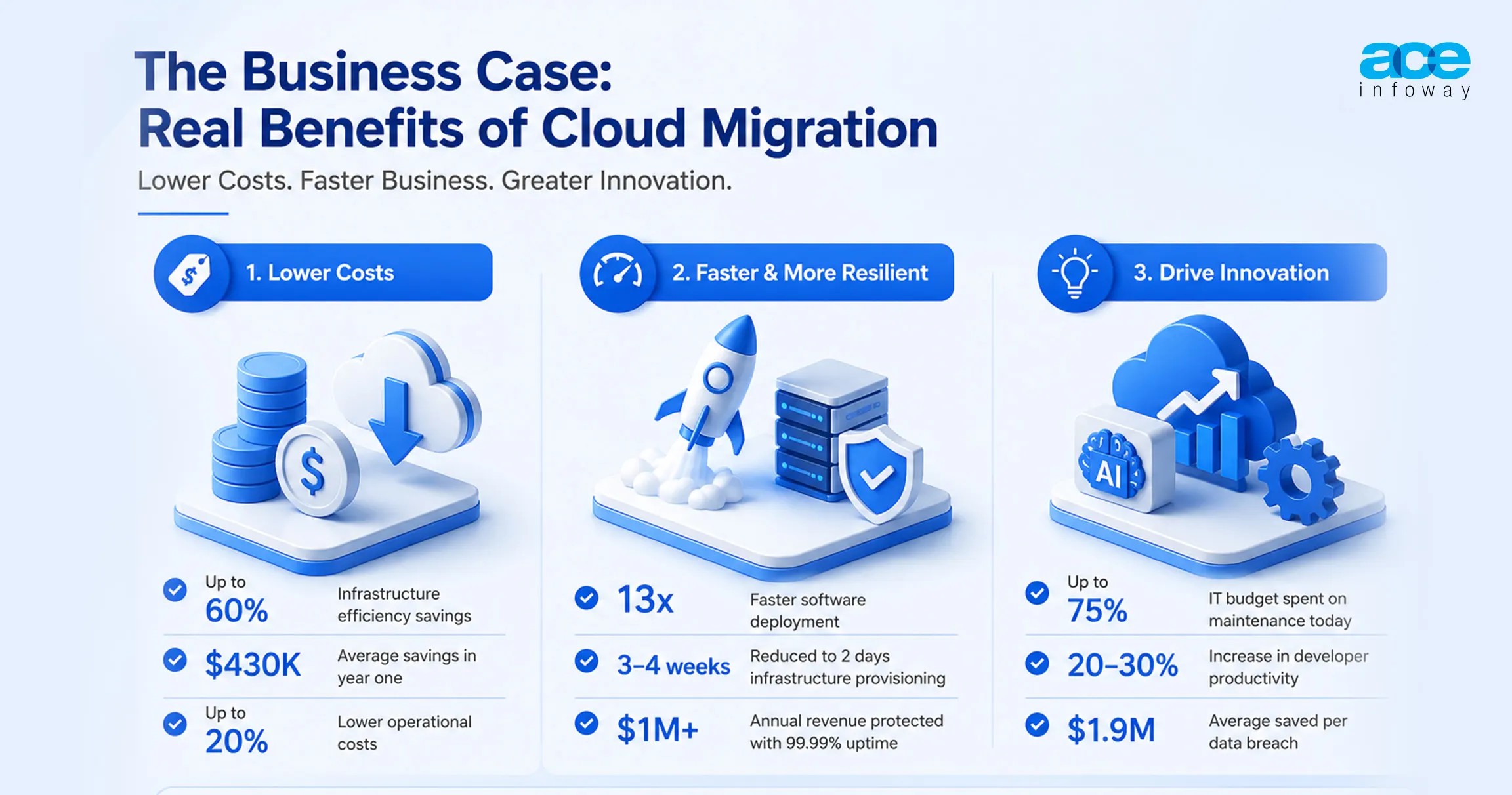
Cloud migration goes beyond replacing infrastructure, providing substantial total cost of ownership (TCO) savings through shifting from Capex to OpEx models.
- Real Cloud Cost Optimization Savings: Enterprises that spend on cloud cost optimization during migration see an average of $430k in savings the first year.
- Storage and compute power savings: Total savings are 60% and 20% for infrastructure efficiency and are possible with Rapid rehosting (Lift and Shift). Portfolios of enterprise applications have seen more than 50% cost savings from more advanced containerization.
- Operational Culling: Plan the phase-out of unnecessary applications before migration, reducing the complexity and operational costs by up to 20%.
Speed and Resilience
The cloud enables organizations to pivot at market speed, directly impacting time-to-market and revenue protection.
- Deployment Velocity: Transitioning to container-based environments allows enterprises to ship software nearly 13X faster than on-premises alternatives.
- Provisioning Agility: Large-scale migrations have proven the ability to reduce infrastructure provisioning time from 3–4 weeks down to just 2 days.
- The Value of Uptime: Moving from 95% on-premises uptime to a 99.99% cloud SLA can save a mid-sized enterprise over $1 million annually in protected revenue, based on an average downtime cost of $5,600 per minute.
- Stabilization: Adopting a phased, wave-based migration approach results in 30% faster stabilization and 20% lower unplanned downtime compared to wholesale transitions.
The Bigger Prize: Innovation Value, Not IT Savings
The ultimate financial goal of migration is the “Innovation Flywheel” reinvesting maintenance savings into high-impact digital initiatives.
- Shifting the Budget Mix: Companies with legacy infrastructure currently spend up to 75% of their IT budget on maintenance rather than innovation. Migration aims to flip this ratio.
- Developer Productivity: Shifting to cloud-native environments typically delivers a 20% to 30% increase in developer productivity, allowing teams to focus on revenue-generating features rather than server management.
- AI and Automation: By 2026, over 60% of cloud operations will involve AI-based automation, drastically reducing manual monitoring costs.
- Security ROI: Organizations utilizing AI-driven security tools within their cloud environments save an average of $1.9 million per data breach.
Disposition precedes platform selection. Choosing a hyperscaler before assessing the portfolio commonly produces a plan optimized for the provider rather than the estate.
Cloud Migration Strategies: The 7 Rs and How to Choose Per Workload
The technical spine of a successful transition is the 7R Framework, a standardized model used to map each application to its most effective migration path. In 2026, choosing a strategy is no longer just about technical compatibility; it involves balancing AI-readiness, sustainability goals, and multi-cloud flexibility.
The 7 Rs Explained
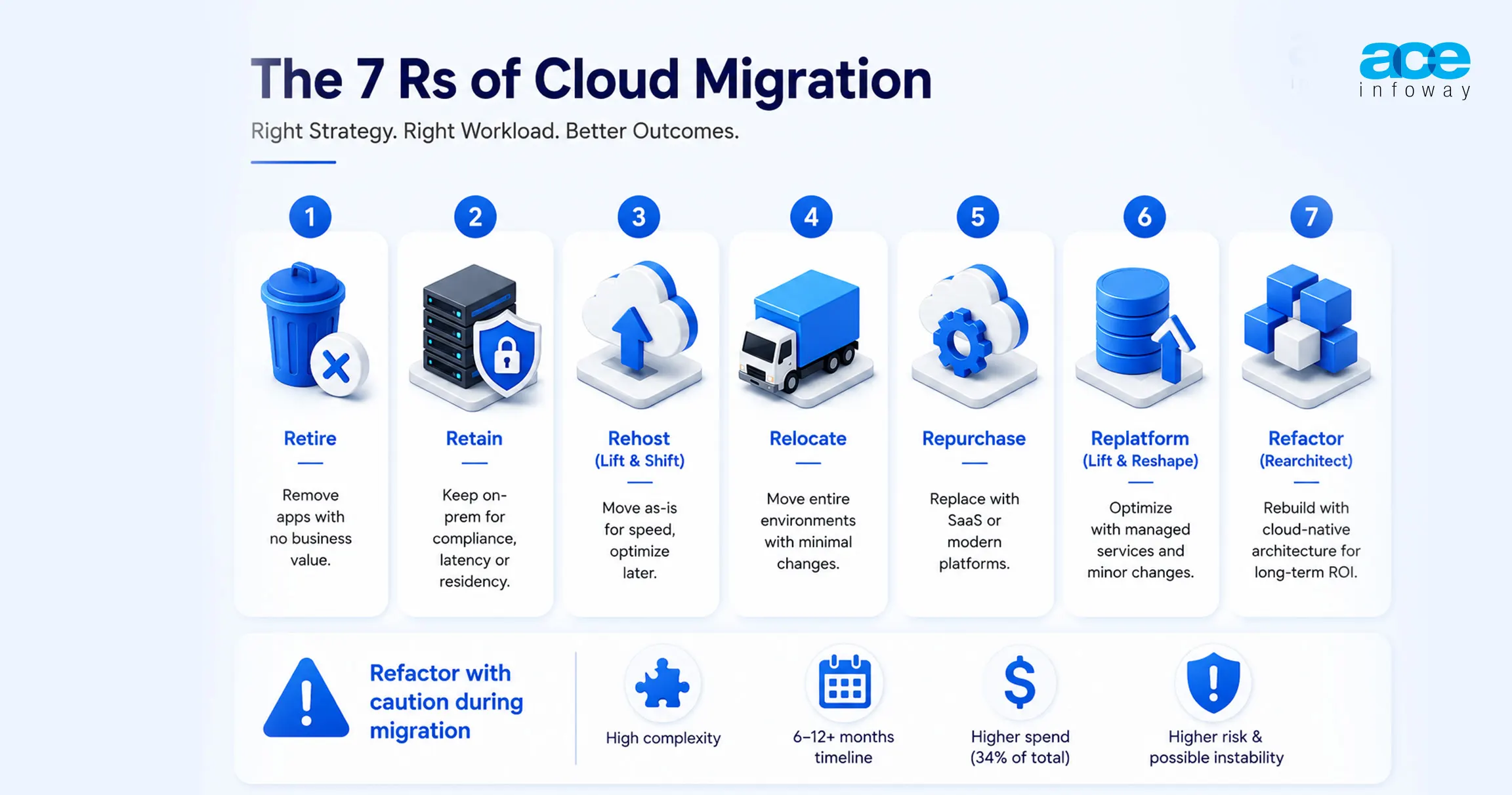
Modern cloud consulting relies on these seven categories to determine the fate of every workload in the enterprise portfolio:
- Retire: Culling applications that no longer provide business value. This strategically cuts unnecessary complexity and can save up to 20% in operational costs.
- Retain: Keeping workloads on-premises due to data residency, latency, or compliance reasons. These systems are increasingly integrated into “connected hybrid ecosystems” rather than being isolated.
- Rehost (Lift and Shift): Moving applications to the cloud “as-is” with minimal changes. While fast, it often results in higher ongoing OpEx because the apps aren’t optimized for cloud efficiency.
- Relocate: Moving entire environments (such as VMware Cloud) without major rework or code changes. This is popular in regulated industries for rapid, compliant adoption.
- Repurchase: Shifting from a perpetual license to a SaaS model. In 2026, this includes moving to specialized AI and industry-focused data platforms.
- Replatform (Lift and Reshape): Making modest optimizations, such as upgrading the operating system or moving to a managed database service (like Amazon RDS or Azure SQL), without changing the core application architecture.
Refactor (Rearchitect): Rebuilding applications using cloud-native features like serverless, containers, or microservices. This offers the highest long-term ROI but carries the highest upfront cost and risk.
Why Refactoring During Migration Usually Backfires
While refactoring offers the “biggest prize” in terms of scalability, attempting it during the initial migration phase is a common cause of failure.
- Technical Complexity: Refactoring has “extremely high” technical complexity compared to other methods.
- Timeline Expansion: A typical refactor takes 6 to 12+ months, whereas rehosting can be completed in a fraction of that time.
- Capital Bleed: Refactoring represents 34% of total migration spend. If the business case was built on rapid “double-run” reduction, the extended timelines of a refactor can evaporate projected savings.
- Operational Risk: Rewriting core applications can introduce new bugs, leading to an initially inferior user experience compared to the stable legacy version.
Disposition Decision Matrix: Assigning Strategy
Consultants use a weighted matrix to assign a strategy to each application based on business impact and technical complexity.
| Application Modernization Decision Matrix | ||
| If the workload… | …and the technical state is… | Recommended “R” |
| Has zero active users or redundant data | Any | Retire |
| Requires <5ms latency or has strict data sovereignty | Any | Retain |
| Is a standard utility (Email, HR, CRM) | Legacy or Outdated | Repurchase (SaaS) |
| Is mission-critical and needs immediate exit | Rigid but functional | Rehost / Relocate |
| Needs better scale but core code is stable | Modern OS / Standard DB | Replatform |
| Is a core differentiator with high seasonal variance | Highly monolithic / Brittle | Refactor |
| Is experimental and requires rapid iteration | Modern cloud-native | Re-architect / Re-build |
What a Typical Enterprise Portfolio Split Looks Like?
Enterprises rarely rely on a single path. A representative “value-balanced” breakdown of a modern enterprise application portfolio typically looks like this:
- Replatform (47%): The “middle path” is now the dominant strategy, offering a balance of speed and managed service efficiency.
- Rehost (24%): Primarily used for rapid data center exits or stable legacy apps.
- Retain (11%): Systems waiting for future upgrade cycles or those with hard physical dependencies.
- Retire (7%): Immediate culling of “zombie” applications identified during discovery.
- Repurchase (5%): Moving commodity functions to SaaS.
- Refactor (5%): Deep investment reserved for the highest-value, high-impact applications.
- Reimagine (1%): Total business process transformation using cutting-edge AI or cloud-native innovation.
Cloud Migration Steps: The Phase-by-Phase Process That Actually Holds Up
This is not normally a technology problem; those who invest in it profit from it. It’s a failure in execution caused by poor organization and management. It takes more than a one-off IT project to make a migration successful; it’s a major restructuring of how the business operates.
Phase 1: Discovery and inventory
This is often overlooked, with most enterprises using old Configuration Management Databases (CMDBs) that don’t accurately track active running software. This is the first pillar of Governance failure: an incomplete portfolio assessment.
- Deploy dynamic, data-driven discovery tools (Google Cloud Migration Center), capture real-time usage telemetry, and track zombie applications.
- The goal is to find the greater value opportunities and confirm and validate the estimated Total Cost of Ownership (TCO) before investing capital.
Phase 2: Information on the migration readiness and workload.
Those who do a formal readiness assessment before migration experience significantly better results. This step includes mapping of all applications to the 7R Framework (Retire, Retain, Rehost, and others).
- Classify workloads based on Business criticality and technical complexity. This is where the business case is developed and is a justification to the Board for spending this money, linked to innovation objectives such as AI-readiness.
- As a result of a strategic action of removing underused apps (Retire), Success Metric immediately reduces TCO.
Phase 3: Dependency Mapping
It’s the second area that most teams fail to invest in enough, and dependencies are a major concern for delays in migration.
- Perform exhaustive network flow mapping to avoid latency nightmares. In this step, you will create a map of all the network flows. You must know which apps connect with which database. If you change one without changing the other, it can halt operations.
- Focus on high blast radius systems, or systems where downstream services have the longest coupling, so they are moved together in the same wave.
Phase 4: Migration Wave Planning.
This does not need to be a high-risk wholesale transition but follows best practice, which recommends a roadmap that follows a ‘wave’ approach.
- Group works in waves according to risk and objective. Do a small pilot migration to a small portion of non-critical workloads.
- The overall migration timeline is shortened, and teams can test the security design before scaling by implementing a pilot first.
- Migration Factories are used to automate these workloads, which are grouped and migrated in order of priority, to keep the business running smoothly.
Phase 5: Execution and Cutover
The biggest financial concern here is parallel running (double run), running both existing data centers and new cloud environments.
- Complete the migration in accordance with the Migration Runbook, which helps to ensure accountability throughout. Move data in bulk using automated tools, and validate records and data sums after the move.
- A true percentage of the overall migration budget is spent on this phase, and a quick end to legacy assets is important to safeguard margins.
Phase 6: Optimization and FinOps phase
In this phase, post-migration costs and risks are handled and optimized.
- The cost ownership issue with orphans is that central IT pays the cloud bill, and the application owner has no reason to take steps to optimize its usage.
- Start a Cloud Center of Excellence (CCoE) and adopt FinOps 2.0 to pass the buck for cloud costs to the engineering teams. This involves resource resizing and using Agentic AI to turn off idle environments automatically.
- Cloud cost optimization investments by organizations ensure the margins remain safe long after the migration project has been completed.
- Optimization is not the result; it is a continuous process. It’s an ongoing cycle of Inform, Optimize, Operate to ensure cloud spend goes hand-in-hand with business growth.
Conclusion
For most organizations facing a hardware refresh or colocation renewal, the decision to migrate has already been made by circumstance. What remains open is whether the program runs against an assessed portfolio with assigned dispositions, a validated dependency map, a documented security baseline, and a named owner for cost after cutover.
Organizations that complete on schedule are distinguished by governance, not technology: sponsorship, a roadmap built in advance, and capability hired ahead of need. That assessment work is measured in weeks. Omitting it is measured in quarters.
Frequently Asked Questions
What is cloud migration consulting?
Cloud migration consulting is an advisory and delivery service that assesses existing infrastructure, assigns the right migration strategy to each workload, sequences migration into waves, and manages execution through cutover and post-migration optimization. Most programs begin with a six to twelve week assessment.
How long does an enterprise cloud migration take?
A lift and shift migration can be completed in weeks, while a typical enterprise cloud migration averages around eight months. Programs that include legacy application refactoring often take 18 to 36 months, depending on workload complexity and modernization goals.
What are the 7 Rs of cloud migration?
The seven cloud migration strategies are Retire, Retain, Rehost, Relocate, Repurchase, Replatform, and Refactor. Many organizations use these approaches to decide the most effective modernization path for each workload.
Are cloud environments less secure than on-premises infrastructure?
Not necessarily. Security depends on configuration, governance, and workload management rather than deployment location alone. Organizations that manage cloud environments with strong security controls, monitoring, and compliance practices can achieve security outcomes comparable to or better than traditional on-premises infrastructure.