








|
Getting your Trinity Audio player ready...
|
Table of Contents
A clean WooCommerce install does the basics. It lists products, takes orders, and shows a cart. That is where most stores stall.
The gap between a store that sells and one that just exists lies in the plugin layer. WooCommerce supports more than four and a half million online stores and controls around one-third of the eCommerce market globally, a dominance that often settles the Shopify vs WooCommerce debate for growing brands.
This guide reviews essential WooCommerce plugins on parameters that actually matter to your bottom line. The goal is simple. Help you decide what belongs in your store, and what is just noise.
Why Your Plugin Stack Decides Whether You Scale?
Every WooCommerce store reaches a point where default functionality runs out. You need faster pages because Google punishes slow ones. You need backups because one bad update can erase months of work. You need abandoned-cart recovery because 70% of shoppers leave without buying.
Each plugin that’s installed is a load. A security surface, potential conflicts, database calls, and code. So there’s never a question of “more plugins versus fewer. It’s “the right plugins, well configured vs. a pile of overlapping tools that are fighting with each other.
If you’re treating your store as a serious business, you must consider the plugin stack as a foundational architecture choice. This is exactly how professional WooCommerce development services approach a custom build.
How Did We Evaluate These WooCommerce Extensions?
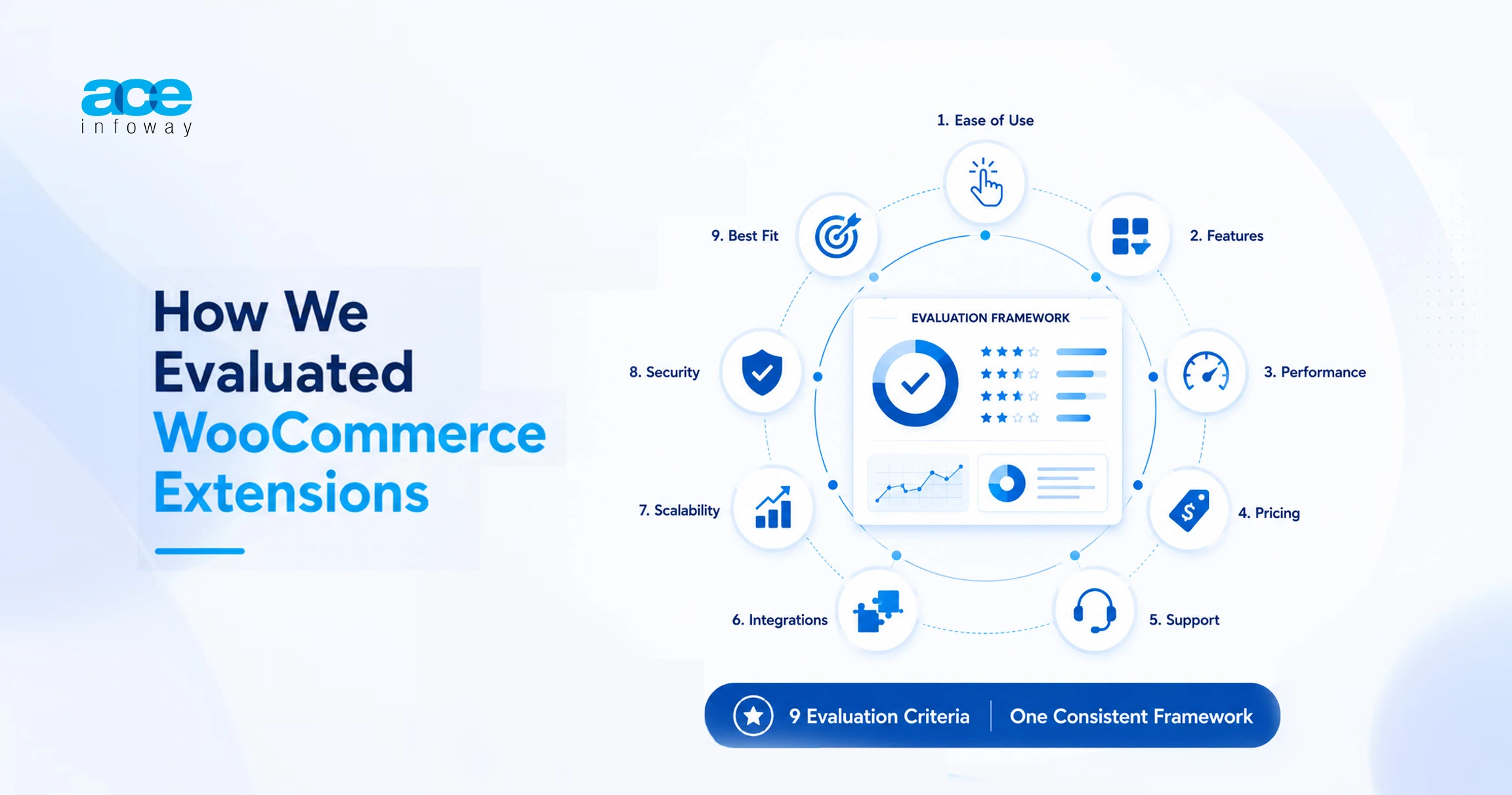
Every one of the top 10 plugins listed below receives ratings based on nine criteria. Ratings are given from 1 to 5, with 5 as excellent.
The top parameters for choosing the right WooCommerce plugins are,
- Ease of use: How fast a non-technical owner gets value.
- Features: Depth and breadth of what it does.
- Performance impact: Effect on page speed and server load. A higher score means a lighter footprint.
- Pricing: Value for money, not just cheapness.
- Support: Documentation, responsiveness, community.
- Integrations/compatibility: How well it plays with WooCommerce versions and other tools.
- Scalability: How it holds up as catalog and traffic grow.
- Security/compliance: Security posture and PCI or GDPR relevance where applicable.
- Best for: The store type and stage it suits.

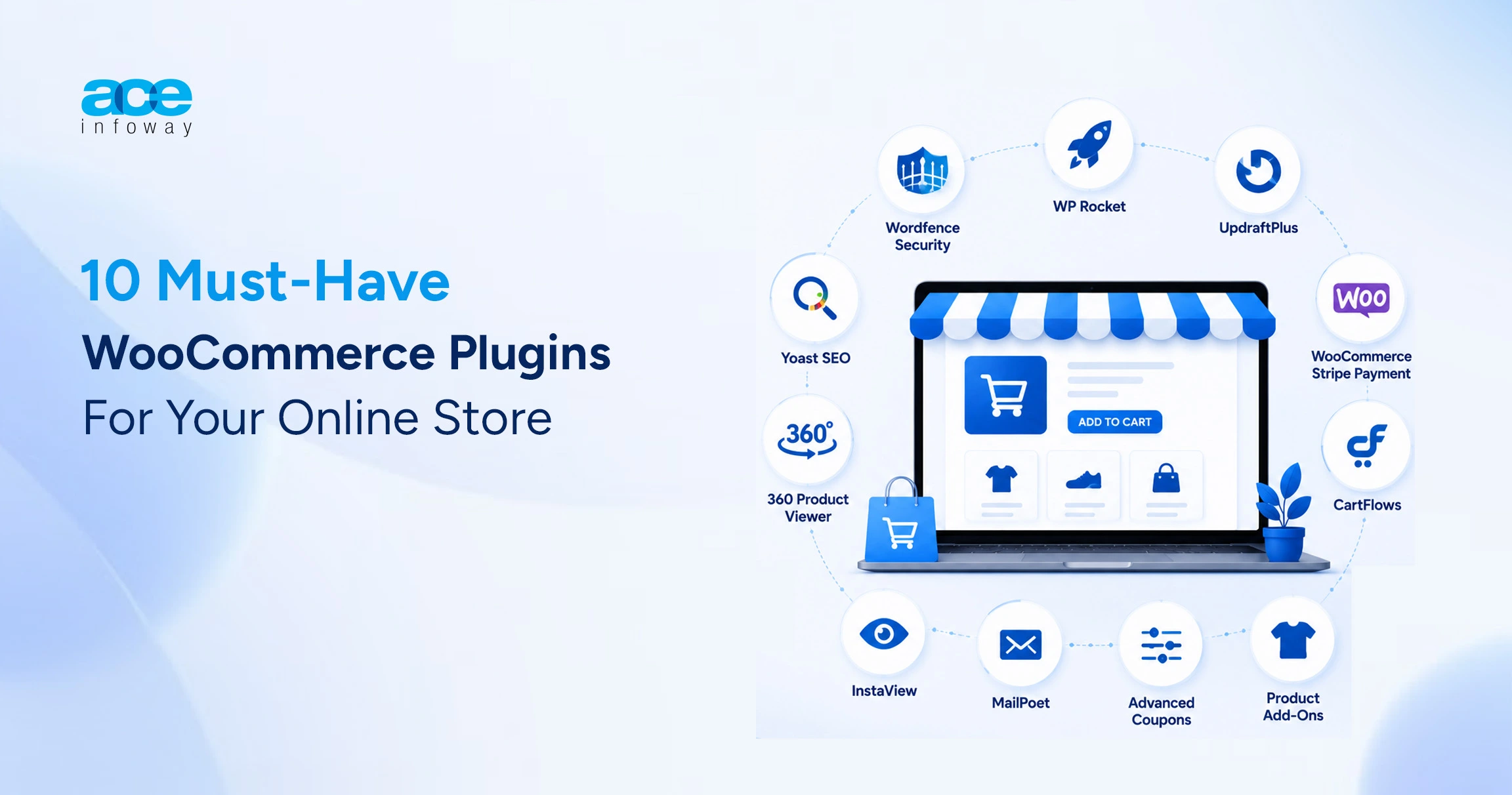
1. Yoast SEO (with WooCommerce SEO Add-On)
Yoast has over 12 million active users and a 4.8 rating on WordPress.org. It’s extended with product schema, optimized social previews, and cleaner XML sitemaps for your catalog by the WooCommerce SEO add-on. That’s what you need to help make your products appear as rich results in Google.
| SEO Plugin Evaluation Summary | ||
| Parameter | Rating | Notes |
| Ease of Use | 4.5 / 5 | Traffic-light system guides non-experts. |
| Features | 4.5 / 5 | Product schema, sitemaps, readability analysis. |
| Performance Impact | 4 / 5 | Light, but settings need tuning. |
| Pricing | 4 / 5 | Free core version available. |
| Support | 4.5 / 5 | Deep documentation and fast premium support. |
| Integrations / Compatibility | 5 / 5 | Near-universal theme and plugin compatibility. |
| Scalability | 4.5 / 5 | Handles large catalogs efficiently. |
| Security / Compliance | 4 / 5 | Low risk and frequently patched. |
| Best For | Content-led Stores | Catalogs that compete on organic search. |
2. 360 Product Viewer for WooCommerce
The 360 Product Viewer for WooCommerce lets shoppers drag, spin, and explore every angle of a product before they buy. Built by QeWebby, the plugin integrates directly into WooCommerce product pages via a simple shortcode, supports full-screen mode, zoom, and configurable spin speed.
For stores selling physical goods where detail matters, such as furniture, footwear, electronics, and jewelry, it turns product pages into something closer to a hands-on experience.
| WooCommerce 360° Product Viewer Evaluation Summary | ||
| Parameter | Rating | Notes |
| Ease of Use | 4 / 5 | Shortcode setup with settings available in the WooCommerce panel. |
| Features | 4 / 5 | 360° spin, zoom, fullscreen view, drag controls, and auto-spin functionality. |
| Performance Impact | 3.5 / 5 | Image-heavy implementation; optimize 360° image sets for faster loading. |
| Pricing | 5 / 5 | Completely free plugin. |
| Support | 3.5 / 5 | Managed by a small team with limited public review history. |
| Integrations / Compatibility | 4 / 5 | Cross-browser compatible; some themes may require minor code snippets. |
| Scalability | 4 / 5 | Supports multiple 360° views on a page through shortcodes. |
| Security / Compliance | 4 / 5 | Low-risk plugin actively maintained for PHP 8.1+ compatibility. |
| Best For | Visual-product Stores | Catalogs where seeing every angle helps drive purchase decisions. |
3. WP Rocket
A one-second delay in load time can cut conversions by 7%. WP Rocket is the caching plugin most agencies reach for because it ships sensible defaults that work the moment you activate it. No cryptic configuration. Page caching, file minification, lazy loading, and database cleanup are either enabled or just one click away.
| WP Rocket Evaluation Summary | ||
| Parameter | Rating | Notes |
| Ease of Use | 5 / 5 | Works immediately after activation with minimal configuration. |
| Features | 4.5 / 5 | Caching, minification, lazy loading, and database cleanup tools. |
| Performance Impact | 5 / 5 | Delivers direct and measurable website speed improvements. |
| Pricing | 4 / 5 | Starts at $59/year for a single website. |
| Support | 4.5 / 5 | Responsive support team with strong technical expertise. |
| Integrations / Compatibility | 4.5 / 5 | Compatible with most hosting providers, themes, and plugins. |
| Scalability | 4.5 / 5 | Maintains strong performance during traffic spikes. |
| Security / Compliance | 4 / 5 | Low-risk plugin with frequent updates and maintenance. |
| Best For | Every Serious Store | Store owners experiencing slow page loads or checkout performance issues. |
4. Wordfence Security
Wordfence is downloaded more than 121 million times, and has over 5 million active installs, making its firewall rules the most tested against real-world attacks of any competitor. It provides you with a web application firewall, malware scanning, login protection, and real-time threat alerts. For a store that deals with customer information and payment flows, it’s not an option.
| Wordfence Security Evaluation Summary | ||
| Parameter | Rating | Notes |
| Ease of Use | 4 / 5 | Powerful security controls with a moderate learning curve. |
| Features | 5 / 5 | Firewall, malware scanning, login protection, and threat detection. |
| Performance Impact | 3.5 / 5 | Security scans can be resource-intensive on some hosting environments. |
| Pricing | 4.5 / 5 | Robust free version available; Premium plans start at $149/year. |
| Support | 4.5 / 5 | Active support team focused on WordPress security best practices. |
| Integrations / Compatibility | 4.5 / 5 | Works well across most WordPress themes, plugins, and hosting environments. |
| Scalability | 4 / 5 | Scan scheduling can be optimized to support larger stores. |
| Security / Compliance | 5 / 5 | Its strongest area, helping support PCI compliance and payment security requirements. |
| Best For | Data-handling Stores | Any ecommerce store processing payments or handling sensitive customer data. |
5. UpdraftPlus
UpdraftPlus is currently used by more than 3 million websites and is the leading WordPress backup plugin. It schedules backups and keeps the copies offsite in Google Drive, Dropbox, or Amazon S3 and restores them with a single click. If ever a plugin or migration problem makes your store crash, the backup utility to fall back on.
| UpdraftPlus Backup Evaluation Summary | ||
| Parameter | Rating | Notes |
| Ease of Use | 4.5 / 5 | Simple backup scheduling and restoration process. |
| Features | 4.5 / 5 | Scheduled backups, off-site storage, and one-click restore functionality. |
| Performance Impact | 4.5 / 5 | Runs efficiently in the background with minimal server load. |
| Pricing | 4.5 / 5 | Free core version available; Premium plans start at $42/year. |
| Support | 4 / 5 | Comprehensive documentation with premium support options. |
| Integrations / Compatibility | 5 / 5 | Supports a wide range of cloud and remote storage destinations. |
| Scalability | 4 / 5 | Premium version includes incremental backups for larger stores. |
| Security / Compliance | 4.5 / 5 | Off-site backups improve resilience and disaster recovery readiness. |
| Best For | Every Store | Store owners who prioritize disaster recovery and business continuity. |
6. InstaView for WooCommerce
The higher the number of clicks required for a customer to make a decision about a product, the higher the likelihood of them bouncing. The “Insta View” button is added to product listings to allow the shopper to view the product page in a modal pop-up without leaving the product listing or category page.
The InstaView plugin is light, mobile-friendly, and works with any WordPress theme right out of the box. It can be used to enable WPML for multilingual stores, you can switch between the quick-view button on mobile devices (on/off), and it also includes button/link style options to fit your brand’s tone of voice.
| WooCommerce Quick View Plugin Evaluation Summary | ||
| Parameter | Rating | Notes |
| Ease of Use | 4.5 / 5 | Enable and use immediately with minimal configuration. |
| Features | 3.5 / 5 | Modal popup display, customizable button styles, and WPML support. |
| Performance Impact | 4.5 / 5 | Lightweight plugin with no heavy dependencies. |
| Pricing | 5 / 5 | Available free of charge. |
| Support | 3.5 / 5 | Supported by a dedicated team, though still relatively early-stage. |
| Integrations / Compatibility | 4.5 / 5 | Compatible with most WooCommerce stores and WordPress themes. |
| Scalability | 4 / 5 | Works effectively for both small and large product catalogs. |
| Security / Compliance | 4 / 5 | Low-risk plugin with updates supporting WordPress 6.9. |
| Best For | Browse-heavy Stores | Category-rich catalogs where faster product discovery helps increase conversions. |
7. Elementor Pro
Elementor is the most popular visual page editor for WordPress, and WooCommerce-specific widgets, like custom product pages, dynamic templates, and a customizable checkout, are added to the Pro version. It alters the math for those store owners who want to maintain visual control without having to consistently hire WooCommerce developers to make routine layout tweaks
| Elementor WooCommerce Builder Evaluation Summary | ||
| Parameter | Rating | Notes |
| Ease of Use | 4.5 / 5 | Drag-and-drop editor with a gentle learning curve. |
| Features | 5 / 5 | WooCommerce widgets, dynamic templates, and advanced design controls. |
| Performance Impact | 3.5 / 5 | Can introduce page bloat if too many widgets and effects are used. |
| Pricing | 4 / 5 | Elementor Pro plans start at approximately $99/year. |
| Support | 4 / 5 | Backed by a large community and premium support options. |
| Integrations / Compatibility | 4.5 / 5 | Extensive addon ecosystem with broad WooCommerce compatibility. |
| Scalability | 4 / 5 | Scales well when widget usage is managed carefully. |
| Security / Compliance | 4 / 5 | Regular updates help maintain security and compatibility. |
| Best For | Design-led Stores | Store owners who want full control over layouts and customer experience. |
8. Stripe Payment Gateway for WooCommerce
The official Stripe gateway brings credit cards, Apple Pay, Google Pay, and dozens of local methods into WooCommerce with strong fraud tooling and Strong Customer Authentication baked in. It is PCI-compliant by design, which keeps sensitive card data off your server and reduces your compliance burden significantly.
| Stripe for WooCommerce Evaluation Summary | ||
| Parameter | Rating | Notes |
| Ease of Use | 4.5 / 5 | Guided setup process with a clear and user-friendly dashboard. |
| Features | 4.5 / 5 | Supports cards, digital wallets, Strong Customer Authentication (SCA), and fraud prevention tools. |
| Performance Impact | 4.5 / 5 | Hosted payment processing minimizes load on your store. |
| Pricing | 4 / 5 | Free plugin with transaction-based payment processing fees. |
| Support | 4 / 5 | Supported by extensive Stripe documentation and WooCommerce resources. |
| Integrations / Compatibility | 5 / 5 | Deep integration with WooCommerce and a wide range of ecommerce tools. |
| Scalability | 5 / 5 | Built to handle high transaction volumes reliably. |
| Security / Compliance | 5 / 5 | PCI-compliant payment processing with built-in SCA support. |
| Best For | Global-selling Stores | Businesses that need reliable card payments and digital wallet support across markets. |
9. CartFlows
CartFlows is a funnel and checkout builder that replaces the standard multi-step checkout with optimized one-page flows, order bumps, and one-click upsells. Stores that add post-purchase upsells routinely lift average order value, and CartFlows makes that mechanic available without custom WooCommerce development.
| FunnelKit Evaluation Summary | ||
| Parameter | Rating | Notes |
| Ease of Use | 4 / 5 | Template-driven setup with a moderate learning curve. |
| Features | 4.5 / 5 | Sales funnels, order bumps, one-click upsells, and checkout optimization tools. |
| Performance Impact | 4 / 5 | Maintains good performance when funnels are implemented strategically. |
| Pricing | 3.5 / 5 | Pro plans start at approximately $189/year. |
| Support | 4 / 5 | Helpful documentation, onboarding resources, and customer support. |
| Integrations / Compatibility | 4.5 / 5 | Integrates with Elementor, Stripe, WooCommerce, and other popular tools. |
| Scalability | 4.5 / 5 | Designed to support growing stores focused on increasing average order value. |
| Security / Compliance | 4 / 5 | Relies on the compliance and security standards of connected payment gateways. |
| Best For | Conversion-focused Stores | Store owners looking to increase average order value through optimized funnels and upsells. |
10. MailPoet
MailPoet is integrated into the WordPress admin and works with WooCommerce to power newsletters, automated order emails, and abandoned cart recovery. For stores that already have traffic, abandoned cart emails are one of the better ROI plugins on the list to recover a significant percentage of lost sales.
| MailPoet Evaluation Summary | ||
| Parameter | Rating | Notes |
| Ease of Use | 4.5 / 5 | Native WordPress dashboard with easy-to-create automations. |
| Features | 4 / 5 | Email newsletters, automation workflows, and abandoned cart recovery. |
| Performance Impact | 4 / 5 | Email delivery is offloaded to MailPoet servers, reducing site load. |
| Pricing | 4.5 / 5 | Generous free tier with pricing that scales based on subscriber count. |
| Support | 4 / 5 | Comprehensive documentation and responsive support channels. |
| Integrations / Compatibility | 4.5 / 5 | Deep WooCommerce integration with customer and order data synchronization. |
| Scalability | 4 / 5 | Flexible plans support growth as your subscriber list expands. |
| Security / Compliance | 4.5 / 5 | Includes GDPR-friendly consent management and subscriber data controls. |
| Best For | Repeat-purchase Stores | Store owners focused on building owned audiences and driving repeat sales. |
Bonus: Smart Coupons by StoreApps
Smart Coupons is one of the most popular plugins on the official WooCommerce.com marketplace. It’s a complete promotions engine: BOGO, gift cards, store credit, scheduling, and granular restrictions in one purchase. It is meant to eliminate a few specific, use-only discount plugins and provide one consolidated tool.
| WooCommerce Smart Coupons Evaluation Summary | ||
| Parameter | Rating | Notes |
| Ease of Use | 4 / 5 | Feature-rich interface with a short learning curve. |
| Features | 5 / 5 | BOGO offers, gift cards, store credit, coupon scheduling, and advanced promotions. |
| Performance Impact | 4 / 5 | Well-optimized considering the depth of promotional features provided. |
| Pricing | 4 / 5 | Available as a one-time bundle purchase at approximately $129. |
| Support | 4.5 / 5 | Established product with strong documentation and reliable support. |
| Integrations / Compatibility | 4.5 / 5 | Official WooCommerce extension with broad ecosystem compatibility. |
| Scalability | 4.5 / 5 | Supports sophisticated promotion strategies and large-scale campaigns. |
| Security / Compliance | 4 / 5 | Low-risk extension with ongoing maintenance and updates. |
| Best For | Promo-driven Stores | Store owners running frequent campaigns, discounts, and customer retention promotions. |
How to Sequence Your WooCommerce Plugins?
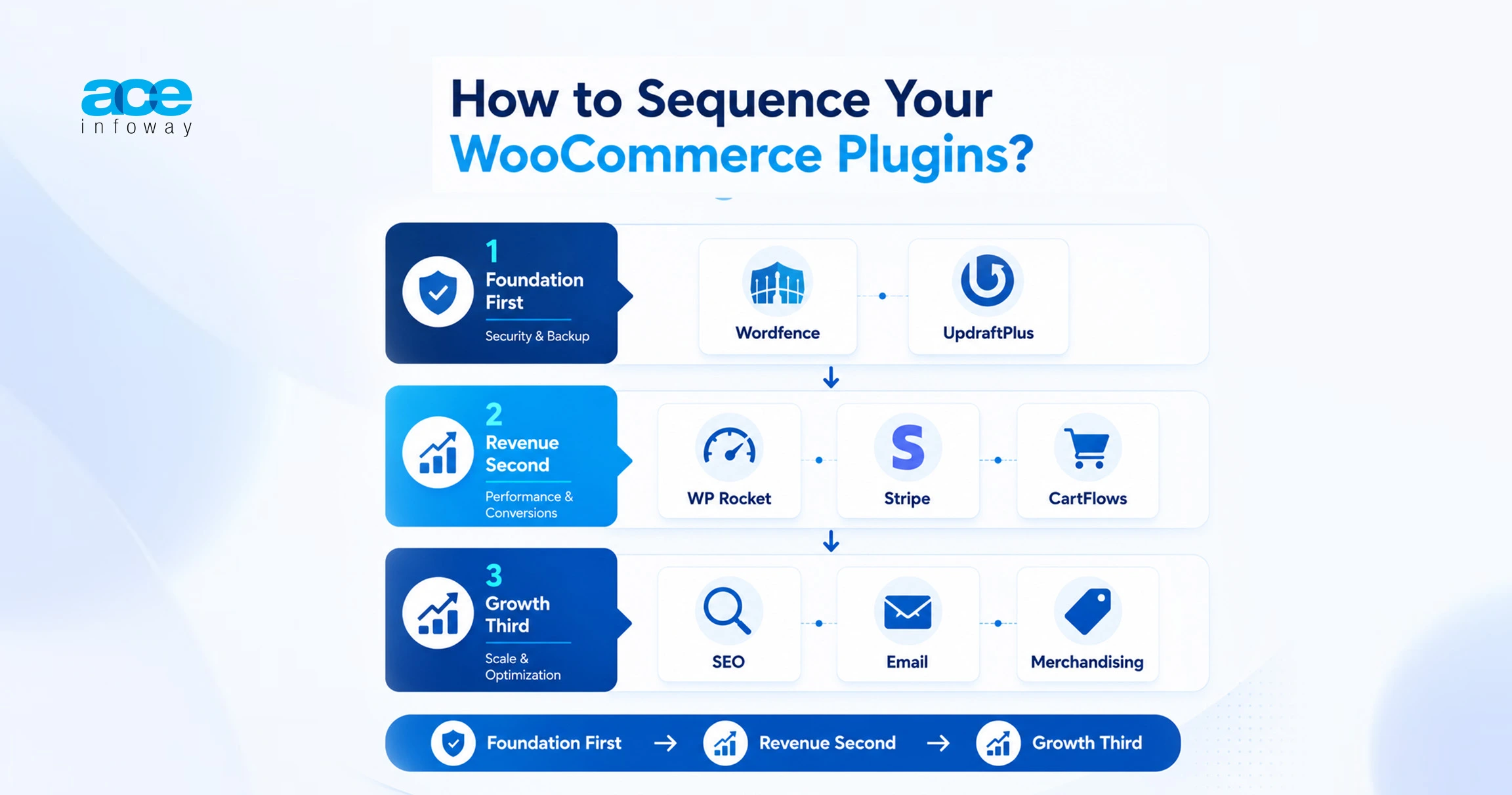
Order matters. Install in the wrong sequence, and you spend launch week firefighting conflicts. Start with the non-negotiables: security and backups. Wordfence and UpdraftPlus go in first, so every later change is protected and reversible. Next, performance.
WP Rocket should be live before you add design weight, so you have a baseline to measure against. Then your revenue layer: payments via Stripe, then checkout optimization with CartFlows. Layer SEO, email, and merchandising plugins last, once the foundation is stable.
This sequence mirrors how disciplined WooCommerce development teams approach a build. Foundation first, revenue second, growth third. It keeps each addition testable and each problem traceable. When something breaks, you know exactly which layer to check.
Conclusion
The best WooCommerce plugins are not the most popular ones. They are the ones that fit your stage, your catalog, and your margins. Security and backups protect what you have built. Performance and payments protect the sale. SEO, email, funnels, and add-ons grow it. Stack them with intent, sequence them with discipline, and your store stops leaking and starts compounding.
You do not need 40 plugins. You need the right 10, configured well. That is the difference between a store that exists and a store that scales.
Frequently Asked Questions
What’s the magic number for the number of WooCommerce plugins that an online store should have?
There is no fixed number; a few well-selected plugins will always beat many overlapping ones. A typical healthy store usually runs between 15 and 25 active plugins covering essential areas like security, performance, payment processing, SEO, and marketing. The main risk isn’t the total count, but rather overlapping functionalities and poor configurations. Every plugin you add should address a distinct issue and justify its presence in your ecosystem.
Are there too many WooCommerce plugins that have an impact on my store’s speed?
Absolutely, but it is less about the sheer number and more about badly constructed or overlapping plugins. A single poorly coded plugin with inefficient database queries can hurt performance more than five well-optimized ones. This is why performance impact is a critical review parameter. You can use tools like Query Monitor to audit your stack, eliminate duplicate functions, and combine robust caching strategies to maintain top speeds.
Is there any safe, free WooCommerce plugin?
Yes, many free plugins like Wordfence, UpdraftPlus (core), and Yoast (core) are highly reliable. A plugin’s safety is tied to the developer’s reputation, update frequency, and active install base rather than its price tag. Look for plugins with high activation numbers, recent updates, and consistent positive reviews. The real security risk lies in using abandoned or unpatched code, whether it is free or paid, as it creates an open attack surface.
What WooCommerce integrations are essential for a fresh WooCommerce store?
Payment and security must be your first priorities. The two most critical integrations for any new store are a dependable payment gateway like Stripe and a PCI-compliant firewall like Wordfence. Next, secure automated backups and performance caching to protect and accelerate your store. Once your traffic scales, you can sequentially introduce advanced tools for SEO, email marketing, and sales funnels. Sequence always beats simultaneity.
Do I need to get people to help me with WooCommerce development?
Most store owners with a small product catalog and standard requirements can manage their setup independently using standard plugins. However, as traffic, complex third-party integrations, performance tuning, and compliance needs grow, professional expertise becomes necessary. When plugin conflicts, sluggish load times, and scaling issues start impacting your sales, it is a clear signal that you need professional WooCommerce development so you can focus on selling rather than firefighting.